BetQ Deposit and withdraw methode For Android User
Play safely with your BetQ deposit. This guide will help you follow the correct steps smoothly and easily. Please follow these steps carefully.

How to Deposit Money
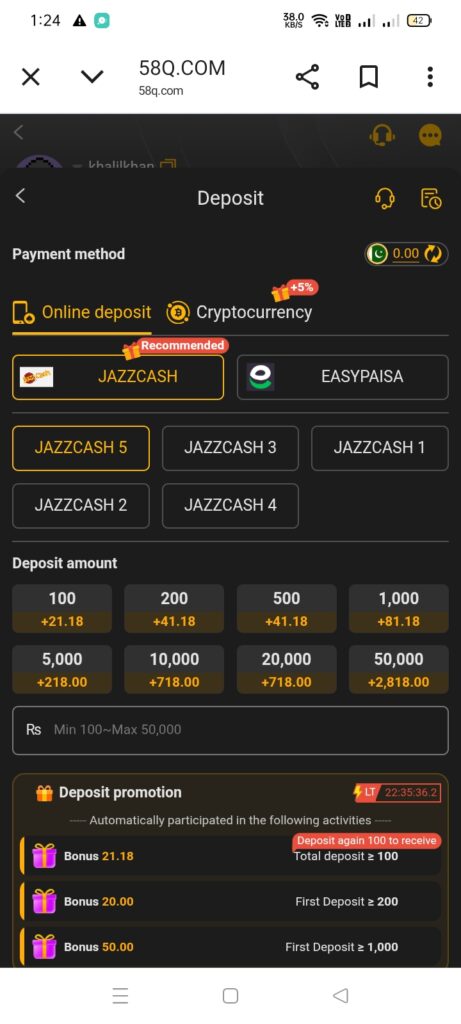
To start playing and earning, you may need to add money to your 58 Q wallet. Follow these steps:
- Open the Betq Game app on your phone.
- Go to the Wallet section.
- Tap on Deposit / Add Funds.
- Choose your preferred payment method:
- JazzCash
- EasyPaisa
- Other supported local wallets
- Enter the amount you want to deposit.
- Confirm the transaction.
- Once successful, your account balance will update instantly.
Tip: Make sure you use the correct number linked to your JazzCash or EasyPaisa account to avoid issues.
How to Withdraw Your Earnings
When you earn money, you can easily withdraw it to your local wallet. Here’s how:
- Open the QBet app.
- Go to the Wallet / Withdraw section.
- First, choose a 6-digit password for safety
- Choose the account that you want to add to your game account.
- Enter the required account details.
- For example, if you are adding an EasyPaisa or JazzCash account, provide the following information:
- Full name of the account holder
- 11-digit account number
- CNIC number
- After submitting these details, the wallet will be added successfully.
- Then, enter the withdrawal amount along with your password to complete the process
- Confirm the withdrawal request.
Your money will be sent to your selected wallet. Most requests are processed quickly, within 30 minutes
Important Notes for Pakistan Users
- Only trusted local wallets like JazzCash and EasyPaisa are supported.
- Make sure your wallet account is verified and active.
- Enter the correct details to avoid transaction failures.
- Contact support if you face any issues with deposits or withdrawals.
Summary (Quick View)
| Action | Detail |
| Permission | Only one withdrawal account can be added per CNIC |
| Withdrawal Failed | Withdrawal does not arrive on time, contact customer support |
| Review Transaction | Withdrawal does not arrive on time. Contact customer support |
| Connectivity | Make sure your internet connection is stable |
| Daily Limit | Level 1 users can withdraw up to PKR 50,000 per day |